Source fidelity

When official vectors disagree

FHWA publishes the 2024 Standard Highway Signs in several formats. During verification, four SVG exports showed small curve distortions that are not present in the primary PDF artwork. mutcd-ts follows the primary artwork and reproduces each corrected shape exactly.

4 SVG conversion defects found
0.00% mismatch after correction
All others audited SVG exports unaffected

Four corrections

The differences, up close

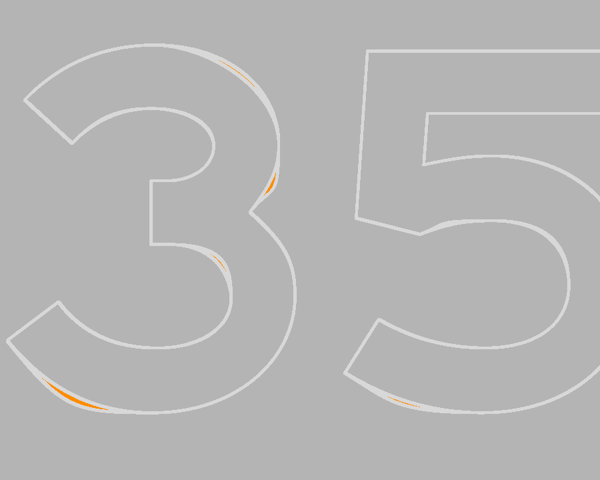
The highlighted diff isolates the changed geometry. Gray shows matching artwork; orange marks the area introduced by the SVG conversion.

R1-1

Stop sign: boxy S shoulder

The SVG export flattens the upper-left shoulder of the S. The PDF keeps a smooth continuous curve, which is the shape used by mutcd-ts.

Published SVG crop with a flattened upper-left shoulder on the letter S
Published SVG
Primary PDF crop with a smoothly rounded upper-left shoulder on the letter S
Primary PDF and mutcd-ts
Diff crop highlighting the flattened S shoulder from the SVG export in orange
Highlighted difference

R11-2

Road Closed: bumped C terminals

The SVG adds small outward bumps where the upper and lower terminals meet the C. The PDF terminals taper cleanly without those protrusions.

Published SVG crop showing small bumps on both open terminals of the letter C
Published SVG
Primary PDF crop showing smooth terminals on the letter C
Primary PDF and mutcd-ts
Diff crop highlighting both unwanted bumps on the letter C in orange
Highlighted difference

W13-1P

Advisory speed: flattened bowls

Several outside curves on the numerals become slightly flat in the SVG. The corrected paths preserve the round bowls from the primary artwork.

Published SVG crop showing flattened outside curves on the numerals 3 and 5
Published SVG
Primary PDF crop showing smooth rounded outside curves on the numerals 3 and 5
Primary PDF and mutcd-ts
Diff crop highlighting the flattened numeral curves from the SVG export in orange
Highlighted difference

W11-1

Bicycle: nicked frame edge

A short edge of the bicycle frame develops a visible nick in the SVG export. The PDF and mutcd-ts retain the intended straight, uninterrupted edge.

Published SVG crop showing a small nick along the bicycle frame near the front wheel
Published SVG
Primary PDF crop showing a clean continuous bicycle frame edge
Primary PDF and mutcd-ts
Diff crop highlighting the nick in the bicycle frame from the SVG export in orange
Highlighted difference

Verification method

Measured, not eyeballed

  1. Start with primary artwork. Compare every published vector against the corresponding PDF at the same physical dimensions.
  2. Normalize print colors. Group CMYK-converted pixels into SHS color classes so color-profile differences do not count as geometry errors.
  3. Diff the geometry. Ignore a one-pixel anti-aliasing boundary, then measure every remaining shape discrepancy.
  4. Verify the render. Render mutcd-ts at the same scale and require these corrected templates to match the primary artwork pixel for pixel.

Official colors may still appear slightly different on screen because the source files contain print CMYK conversions, while mutcd-ts uses the Pantone colors named by the standard.